Showing posts with label Tablet. Show all posts

Monday, April 9, 2012

Best Tablets from Mobile World Congress 2011

This year at the Mobile World congress 2011, some of the best and the most efficient tablets were announced and showcased from major players from all around the world.  Keyboard less computing definitely took another meaning this year at the Mobile World Congress 2011 where the audience were spoilt for choice with some of the best brands such as Samsung, LG, Acer and HTC announcing their new and best tablets 2011 and other companies such as Motorola, HP, ViewSonic and RIM showcasing their best selling tablets.
Given below are some of the best tablets that were on the Mobile World Congress 2011.

HTC Flyer

Over the last few years HTC has transformed drastically and come up with sleeker and feature rich user friendly gadgets that includes smart phones and mobile phones and it has also been successful in taking up a huge market share of the Smartphone market from its competition. HTC has now moved a level further and launched its first tablet device, called the HTC Flyer at the Mobile World Congress 2011 this year. This is one of the best tablets 2011 launched in this event this year. HTC Flyer has a sleek aluminum design, a single core 1.5 GHz Qualcomm processor, a 7 inch wide touch screen with 1024 x 600 pixel resolution, 5 megapixel camera at the back and a 1.3 megapixel camera in the front that takes care of all video conferencing needs and 1GB RAM.  This best tablet device also has better connectivity with Bluetooth 3.0+HS, Wi-Fi, quad band EDGE / GSM and mobile broadband that uses tri band 900/1700/2000 HSPA.  However unlike its other competitors, HTC Flyer uses Android 2.3 operating system also commonly known as Gingerbread, where as it competitors are currently using Android 3.0, known as Honeycomb. HTC Flyer weighs just 415g and the company promises a battery life of 6 hours for their tablet device. HTC Flyer neatly fits between Samsung’s mini tablet and RIM’s BlackBerry.

LG Optimus Pad

LG showcased its much awaited tablet device LG Optimus Pad at the Mobile World Congress 2011 this year and it has made it to our list of the best tablets 2011. LG has left no stone unturned to ensure that its tablet device challenges the best of the best tablet devices.  With a 8.9 inch screen that has 1280×768 WXGA resolution and 15:9 aspect ratio as well as full HD 1080P decoding, LG Optimus Pad definitely enhances the viewing experience of the user. Optimus Pad has also been designed in such a way so that it can be used one handed which is not something that is possible with some of the other bulkier tablet devices available in the market. Other features and specifications include a 1 GHz nVidia Tegra 2 dual core processor and the latest operating system from Google Android, namely Android 3.0 (Honeycomb). The device also has optics that is allows and is capable of 3D video capture using the two 5 megapixel cameras on the back. These features and specifications definitely differentiate LG Optimus Pad from the other tablets in the market making it one of the best tablets 2011.

Samsung Galaxy Tab 10.1

Samsung has been very successful with its earlier release of the Galaxy Tab and the Mobile World Congress 2011 saw Samsung unveil its brand new and latest tablet Galaxy Tab 10.1. some of the features of the Samsung Galaxy tab 10.1 include a 10.1 inch screen that has 1280 x 800 pixel resolution for an enhanced viewing experience, 8 megapixel camera at the back with LED flash and a 2 megapixel camera in the front, 1 GHz nVidia Tegra 2 dual core processor, HD recording capability, full flash browser, Android 3.0 and 4G connectivity.  All this impressive technology has been packed into one device by the mobile and electronics giant, Samsung and the device weighs an impressive 599g only.

HP Touch Pad

HP Touch Pad has been one of the most anticipated tablet devices this year and has made it to our list of best tablets to this year. HP touchpad also showcases HP/Palm’s highly rated WebOS. HP Touch Pad is available in two different configurations; the 16 GB option of the 32 GB option and it has multi touch screen with a 9.7 XGA capacitive display with 18 bit color and the screen offers 1024×768 pixel resolution display. The device also features a 1.2 GHz Qualcomm Snapdragon dual core chip, front facing 1.3 megapixel camera, internal stereo speaker, Wi-Fi 802.11b/g/n and not to mention the popular WebOS. In fact the WebOS is one of the most intuitive tablet operating systems available in the market when compared to all other OS’s out there. The user interface has been designed around cards and these cards are places on your workspace which allows the user to shift between different windows with great ease thus allowing the users to multi task easily. Users can also stack up cards together and group related cards too. However there is no rear camera in this tablet.

Blackberry PlayBook

At the Mobile World Congress 2011, consumers could get a close look at RIM’s already announced Blackberry PlayBook. This is another one of the best tablets 2011 and is popularly known as the ultra portable tablet device in the market today. the features of this best tablet includes a 1024×600 HD display on a 7.1 inch LCD screen that is multi touch and capacitive, a 1 GHz dual core processor, 1 GB RAM, Wi-Fi, full Adobe flash enabled browser, capability to connect to your BlackBerry mobile for a 3G connectivity through the Wi-Fi, 3 megapixel HD camera in the front and a 5 mega pixel HD camera at the back, and HD video capture capability. Aimed at the business market, this device also has features that allow users to connect their PlayBook to a projector in order to display presentations while the best tablet device can still be used to take notes.
With such feature rich best tablets being made available to users all across, one can truly say that it is indeed the year of keyboard less computing.

Saturday, April 7, 2012

Your touch, drives me insane...

Your touch, drives me insane...
Your voice, calls my name...
Your smile, intoxicates me...
Your eyes, see right through me...
Your love, is all i need ♥♥♥♥♥

Friday, April 6, 2012

Rumour: Google Tablet Could Surface In May

Google Tablet Could Surface In May
Google is reportedly prepping the launch of its latest "Nexus tablet" and it could happen as early as May. The company has chosen ASUS to produce the new 7" Android tab. While even the specifications are unknown, the price is widely expected to be around $149-199. This rumour has apparently originated from an anonymous senior employee at a US-based supply chain company for the device who has claimed, "It's a done deal!"
Google seldom makes a direct association with any device. Devices carrying the "Nexus" brand are usually the ones wholly endorsed by it to serve as role-models for others to follow. Therefore, these gadgets are deemed capable of running its OS as the company intends it to work ideally. At this expected cost, the tablet is half as expensive as the new iPad, and on par with the likes of Amazon Kindle Fire that tasted big success last year. While it is unlikely to be a high-powered tablet, the Nexus name virtually ensures that it will be a cut above the rest. We will not have to wait for long to find out as the new tab is expected to make an appearance at the CTIA event in New Orleans that will be held from 8 to 10 May.

Review: Lenovo IdeaPad K1

Review: Lenovo IdeaPad K1
Pros:Sleek UI; Sturdy build quality; Great performance; Excellent viewing angles; Good battery life; Expandable memory; HDMI port.
Cons:Below average camera; No USB port; Lacks equaliser setting.
Lenovo IdeaPad K1
MRP: Rs 32,000
Street Price (As On 14-Nov-2011): Not available in online stores.

The K1 is not only Lenovo's first tablet, but also its first experiment with the Android OS. Although it has crashed the tablet party a little late in the day, its powerful NVIDIA Tegra 2 T20 chipset can still help this device stand out in a crowd. Let's find out how it fares against the likes of the iPads and Galaxy Tabs.


Design And Build Quality
The retail box packs in a tablet, charger, and data cable. The device measures 10.4" (l) x 7.4" (w) x 0.5" (d) and weighs 750 grammes. The front is dominated by the screen that sports a relatively big black bezel. The matte aluminium finish on the sides is pleasant to look at. The textured leather on the back gives it a premium feel and provides a superior grip over the device. Overall, the build quality is impressive.


Unlike most Honeycomb tablets, the K1 features a physical Home button. What's missing though is a micro-USB port. Lenovo has opted for a proprietary port, which is nothing short of an extortionist tactic to make users shell out more for accessories.

Review: Lenovo IdeaPad K1


Review: Lenovo IdeaPad K1

Ports and buttons.


The tablet is powered by a 1 GHz dual-core CPU, and has 1 GB of DDR2 RAM. Other features include a micro-HDMI port, Wi-Fi, Bluetooth, GPS, 5 MP primary and 2 MP front camera, 3.5 mm jack, SIM (for 3G data only) and microSD card slots, 32 GB internal memory (25 GB available for storage), 7400 mAh battery, and a bunch of sensors.


Display And Sound
The10.1"LED-lit touchscreen has pixel dimensions of 1280x800. The screen is bright and contrast levels are good too. Viewing angles are broad, and there's hardly a colour shift even at extreme inclinations. The sound quality of  the two speakers at the back is pretty good, but it could have been louder.


UI And Applications
The K1 runs Honeycomb, with a little twist from Lenovo. Although the standard on-screen navigation keys such as Home, Back, and Menu are present, the physical Home button is a good addition. Apart from providing quick access to the homescreen, the button also supports a few swipe gestures. Think of it as a trackpad found on BlackBerry smartphones. However, getting it to work is a bit of a hit-and-miss affair. Finally, a long press of the button takes a snapshot of the screen.


Review: Lenovo IdeaPad K1

Lenovo has thoughtfully added an option in the Task Switcher to kill apps.


Lenovo's customisation of Android 3.1 is beautiful, and I liked the default wheat field wallpaper. The launcher widget features five Zones (icons), which provides quick access to select apps. Of course, you can personalise this widget and add your favourite apps here.

The manufacturer has also added a Favourite button that looks like a speech bubble. When clicked, it shows thumbnails of your favourite apps. A nice addition, but first-time users might confuse this with the standard Task Switcher. Swiping across the five homescreens is extremely smooth, something you don't usually expect from Android tablets.


Review: Lenovo IdeaPad K1

A thumbnail view of your favourite apps can be seen on the right side of the screen when activating the speech bubble icon in the bottom centre.


The Android Market has truckload of applications, but only a few are optimized for tablets. The others have to be stretched to fit the screen, which results in pixellation. If you compare the number of Honeycomb apps to Apple's offerings, the latter has a clear lead. However, K1's Flash-enabled browser is a big plus over the iPad's crippled counterpart. It renders pages in no time, and shows no signs of a slowdown even while dealing with Flash videos.

Maps and navigation are taken care of by Google Maps. However, the GPS is totally dependent on an internet connection, which makes it useless in remote areas. Rounding off the app selection are complex 3D games such as Galaxy On Fire 2 HD and NFS Shift HD, which run smoothly thanks to NVIDIA's GPU.


Review: Lenovo IdeaPad K1

NFS Shift HD in action.


Multimedia
The default player has a neat interface, and the sound quality is excellent. However, the equaliser setting is nowhere to be seen - an incredibly stupid move.

The video player handles 1080p videos, but playback isn't very smooth. All is not lost though, as 720p video playback is flawless. The player supports DivX, XviD, and MP4 formats out of the box, so you don't have to bother with third-party apps.

Unfortunately, the device's camera produces horrible pictures. The quality is so bad that you won't believe it's a 5 MP snapper. Colours look lifeless and the amount of noise in low-light situations is unacceptable.


Review: Lenovo IdeaPad K1

Camera sample.

The K1 is capable of 720p video recording, and here's the proof:


Battery And Verdict
The 7400 mAh battery's performance is excellent. Under heavy use, the device's battery bar was down to 50% after 4 hours and 40 minutes. For moderate use, the battery easily lasts up to 10 hours, which is quite a feat for Androids.

The K1 provides excellent build quality and great performance in a single package. Lenovo's customisation is far better than those of rival Android tablets. Packed with 32 GB of internal storage, it also covers all the connectivity options such as Wi-Fi, Bluetooth, GPS, and HDMI.

On the flipside though, the camera is bad and the USB port is missing. It's also not the slimmest and thinnest tablet available in the market. Having said that, it deserves our recommendation for providing numerous features and great performance at a price tag of Rs 32,000.


Features: 4/5
Design And Build Quality: 4/5
Performance: 4.5/5
Value For Money: 4/5
Mojo: 4/5

Overall Rating: 4/5

Review: HTC Flyer

Review: HTC Flyer
Pros:Excellent stylus implementation; Good display; Superb performance; Decent battery life; Well-priced.
Cons:Design resembles HTC Radar; Looks tacky at the back; Lacklustre camera.
HTC Flyer
MRP:
Rs 40,000
Street Price (As On 18-Nov-2011): Rs 24,000 (Letsbuy.com; Flipkart.com)


UPDATE: The video review of the HTC Flyer is now available here.


After introducing several noteworthy products in the smartphone arena, HTC has now entered the enticing tablet market. Bringing in the new tablet-oriented Sense UI, and coupled with a stylus known as the Magic Pen, the Flyer attempts to break the clutter of Android tablets.


First Impressions
Frankly, I was a little excited to see what HTC had to offer in this new segment. Having seen it deliver products with a good mix of looks and performance before, I had high expectations from this tablet. Unfortunately, the Flyer let me down in the looks department.

Enveloped in a nice-looking aluminium unibody, the device curves gently at the back, which is edged with white plastic panels at the top and bottom. This makes it look rather tasteless. Moreover, the trio of unmatched colours make it look decidedly uncool. This is especially a pity since the Flyer is so expensive.

The top panel needs to be popped open to insert the SIM and external microSD cards (upto 32 GB). However, opening the top panel can be a very frustrating exercise, and the scratched plastic around the seams on the test piece we received is evident of a previous reviewer's wrath. In fact, we actually had to use a screwdriver blade to lever the panel open. HTC really needs to do something about this, especially considering that the panel will need to be frequently accessed to get to the microSD card.

The Flyer isn't all that heavy for a 7" tablet, but feels that way since it's small enough to hold in one hand. This translates into clumsy one-handed usage whether you are trying to type a mail or read a book. In short, holding it in one hand is something of an exercise! In all fairness though, any device with a screen bigger than 4" is meant to be used with two hands.


Review: HTC Flyer


Review: HTC Flyer

The hard to open panel conceals the SIM and microSD card slots.


Measuring 7.6" (l) x 4.9" (w) 0.5" (d), the Flyer is not the thinnest of gadgets. It is noticeably thicker than the iPad 2 and Samsung GALAXY Tab, but that's only because it has lesser space to pack the hardware into. A totally unnecessary ridge on the bottom plastic cover adds an additional few millimetres to an already bulky design. Thankfully, the back is curved, making it appear slimmer.

The screen is nice and bright, with great colours and contrasts. The pixel dimensions of 1024x600 are great for the 7" LCD screen. The outdoor visibility is amazing and colours look almost natural, even when the screen is placed directly under sunlight. Its broad viewing angles are an added bonus. On the flipside, the screen is not scratch-resistant, and worse, is an absolute fingerprint magnet.

The leather cover the tablet comes with is classy-looking, thanks to its pristine white colour. Small criticism here - there is no space to put the handsfree. So you will still be left stuffing your pockets.


Horsepower And Performance
The Flyer genuinely flies, and its touch experience is quite smooth. Moreover, it handles multitasking with a breeze. No surprises there, since it packs a punch with its 1.5 GHz processor and 1 GB RAM.

HTC has introduced its Sense UI 2.1 for tablet with the Flyer. The new interface is well-integrated with Android Gingerbread 2.3.3. However, I would have loved to see HTC's spin on the Honeycomb, even though it's been primarily designed for screens bigger than 7".

The Flyer is packed to the hilt with all kinds of apps that a tab generally offers, and then some. I pushed the Flyer to its very limit while testing, and it took a very long time to hang or crash. The lag was almost negligible while switching from one app to the next. Lastly, its touch response was smooth and quick. Keep in mind though that if you open too many apps, the OS will automatically close the oldest app in order to free up memory.


Review: HTC Flyer


Bizarrely enough, you cannot use the Flyer on all four sides, which is a little archaic in a time when it's difficult to tell which way is up in most tabs. The HTC logo appears on the top bezel in portrait mode, whereas the camera takes the spot in landscape mode. The Home, Menu, and Back buttons appear on the bottom bezel in both modes, letting you know how you're supposed to hold the device.


The Magic Pen
The product offers a unique stylus in the pack, known as the Magic Pen. This is a full-aluminium, pen-sized stylus that is comfortable to hold. HTC has integrated the capabilities of the Magic Pen with the tablet in an almost seamless fashion. You can doodle on pictures, write notes, and take screenshots with it. You can even pick different styles (pen, highlighter, marker, eraser, etc) and colours from the palette, which can be activated through a small icon on the bottom-right corner of the bezel. There are two tiny buttons on the Magic Pen, used for highlighting and erasing respectively.

While the primary function of the Pen is to take notes, it can also be used to scribble notes in the margin and highlight text, while reading a book, for instance. While limited in its scope, it's certainly a lot of fun to play with. If drawing and painting is your favourite pastime, or even your profession, the Magic Pen is definitely a value-add for you.


Review: HTC Flyer

The Magic Pen in action.

Popcorn And Pics
The media player exceeded my expectations, with sharp, clear visuals and very good audio playback. The loudspeakers are pretty powerful in the Flyer. They are smartly placed on the top right and left of the device in landscape mode, resulting in a nice stereoscopic sound effect.

The 7" screen is perfect for watching most movies and TV shows, and the huge storage capacity of 32 GB will ensure that you have plenty of timepass. Video playback supports the major mobile formats plus WMV, AVI, and XviD. It also plays HD videos in 720p and 1080p. Finally, audio playback supports all major formats.

The camera on the HTC should have been good, considering it's has 5 MP on the back and 1.3 MP in the front. However, the amount of noise is unacceptable, and pictures captured indoors look blurry. It supports 720p video recording, but the quality isn't impressive.


Review: HTC Flyer

Image sample.

Video sample.

Battery Life And Verdict
The Flyer houses a mammoth 4000 mAh battery, which is a good thing. With moderate use, the battery lasted from the start of one day to the end of the second. Even with heavy use that included 30 minutes of video capture, then two hours of Angry Birds, followed by two back-to-back movies, and wrapping up with using Bluetooth and Wi-Fi while running the music player on in the background, the battery lasted for over 12 hours. That's impressive by any standards, all thanks to the massive battery.

The Flyer offers a great Android experience with its snappy performance. It handles multimedia with ease, and its display is also impressive. On the flipside, the camera is lacklustre and the design could have been better (especially that damn top cover). Having said that, at Rs 24,000, the Flyer is a great deal for tablet lovers. Moreover, its stylus makes the deal even sweeter. If you like tablets, you'll just love the Flyer!


Features: 4/5
Design And Build Quality: 3/5
Performance: 4/5
Value For money: 4.5/5
Mojo: 4/5

Overall Rating: 4/5
 

Review: Air Playit

Review: Air Playit
Pros:Flawless playback; Free; Supports most popular formats; Works well even with old devices.
Cons:None.
Air Playit
Price: Free

Love them or hate them, iDevices are by far some of the best media playing devices. However, a major hurdle has been the fact that you need to convert media, especially videos, to compatible formats before you could transfer them to the device to play. This conversion takes time, which is a pain. Another hurdle was that there is only a limited amount of space on the devices, thus not allowing you to place as many videos or even a season of your favourite sitcom in the inbuilt memory. All these hurdles have been overcome by an application known as Air Playit, which makes use of the Wi-Fi capability of these devices to stream media files directly without any pre-conversion. You can literally browse your entire movie collection and pick up the one you want and the best thing is that it even works over the internet if you have a fast enough internet connection on your PC and the iDevice. The best thing is that this application is completely free. We took a look at this interesting application and here is what we have to say.

How It Works?
Air Playit works on a client-server model, which means that a server software resides on your PC, while a client software is installed on your iDevice. It works with the iPhone, iPod touch, and iPad. A version for Android devices is also in the works, but it is not yet ready. We will first take a look at the server software.

Server
While the server software is available for Windows as well as Mac, we have reviewed the Windows version, which is a 16.3 MB download. Mac users can download the 10.1 MB server from here. While we will explain the Windows version, the Mac version is not much different, so this review can be easily followed even by Mac users.

Once you download and install the server software, you must register for free using the form that pops up. All you need to provide is your name, surname, and email address.


Review: Air Playit


Once registered, the server starts running and you are taken to the main window. Here, you can view the information such as the port number, local IP address, and internet IP address, which you must note down for future reference. You can also change the name for the server.


Review: Air Playit


The next page allows you to decide upon password-protected permissions to set for the media being shared. There are different level users such as Admin, who can access all media, Kids, who can access restricted media, while Public level users can access media that is not protected by any PIN or password.


Review: Air Playit


The Shared Folders page, as the name suggests, is to specify media folders to be shared for access to iDevices. Local folders can be chosen by browsing and specifying share name, which will be visible to the iDevice. All the files and folders under the shared folders become shared and accessible as well. Each folder shared in this way can be granted permission levels from the three mentioned on the Permission page. Additionally, you can also import iTunes Playlist and click on Apply.


Review: Air Playit

Next is the Conversion page, where you can choose media for offline background conversion on the PC, to any of the several formats for different Apple devices. In the source contains multiple audio streams, you can choose the one you want in the converted file, in addition to the subtitle language, if any. Multiple files can be added for conversion and they will be queued after the first file.


Review: Air Playit


The next page deals with web browser accessibility of this server from any internet connected device capable of displaying streaming videos. All you need to enable this function by checking the box next to The server can be accessed by web browser, and type the address specified at the bottom of this page, in the web browser of the internet connected device or PC to view the list of media files from the shared folders. On opening the URL, the browser displays a listing of the contents in the HTML format with links to play the media file with live conversion at the server end, or to play the file directly at the original resolution if the internet speed is fast enough at both ends. Clicking on the former will play it at the resolution, bitrate, and fps specified on the Web page.


Review: Air Playit


The last page of the server lets you specify the output folder for the converted files and other settings such as a custom port, if the default conflicts with another application.


Review: Air Playit

Client
Once this server is up and running with the folders shared as required, you can install the client software on your iDevice by searching for Air Playit on the App Store. This is a free application and the proper version for your device will install if you install it directly from the device using Wi-Fi.

The first page of this app lets you specify the server settings. Since we have a local server, you must click on Add Local Server.


Review: Air Playit


If the local server is not visible in the page that opens, you must click on Specify Address Manually. Here, you can specify the details from the first page of the server on the PC, such as local IP address, port number, and PIN if necessary. Do not forget to set the Connection type to Remote Wi-Fi just to be safe. These settings are presets for the streaming audio and video bitrates, with Local Wi-Fi having the highest and 3G having the lowest. You will have to experiment with this setting to find out the highest bitrate possible for streaming videos to your device. If you are going to access the server using a 3G connection or Wi-Fi, but from another location, then you must set this to 3G or Remote Wi-Fi and specify the internet IP address instead. There is a 4G option, but it is of no use for us at present due to the lack of 4G networks. Click on Join.


Review: Air Playit


If all went well, you will now see the server name on the main page.


Review: Air Playit


Clicking on the name of the server will display the shared folders, and clicking on them will display the media files and folders within.


Review: Air Playit


Clicking on the media file opens the playback page. Here, you can choose to either directly play the file, or play it using live conversion. The latter option is especially useful with older devices and when you do not have enough bandwidth. Alternatively, if you want to carry the file around, then you can choose the Offline Conversion option and add it to the Tasks list while specifying attributes such as video bitrate. The file gets converted on the server PC and gets listed in the Air Target folder on the server page. You can then browse to the media in this folder and find that the Download to iDevice option has now got enabled. The video will be transferred to the device over Wi-Fi once you click this option. Alternatively, you can also transfer the file to your iDevice using iTunes and play through the native video player.


Review: Air Playit


You can also specify the video and audio playback bitrate to suit your device's capability. If the file does not play, you can lower the quality a bit and try again. You can also manually specify the resolution, fps, audio stream (in case of multiple audio streams), and subtitle.


Review: Air Playit


Video playback is very similar to the way it plays files locally stored on the device. Playback is considerably smooth and there is no lag at any point of time. It was found to be surprisingly good even on older devices such as the iPhone 3G. Seeking a location on the timeline will take you to the location within no time. Since the user interface is very easy to use, browsing to the required files was found to be very easy.


Review: Air Playit


The Verdict
Air Playit is an excellent free application that does everything only available in paid versions of its competitors. The good thing is that it does everything well, without any restrictions. It supports playback of more than 320 file formats, and can play them back using live conversion on the server. It even supports initiating offline conversion tasks through the client software on the iDevice. The HTTP server is a nifty feature, which lets you access the shared media using any web browser. Video playback is flawless, regardless of the format of the source. The good thing is that it even works with older devices, which are normally incapable of playing HD media. The best thing is that with all its full features, it is completely free. While it is usually true that there ain't no such thing as a free lunch, in this case we have to make an exception.

Features: 5/5
Performance: 5/5
Ease Of Use: 5/5
Value For Money: 5/5
MoJo: 5/5

Overall Rating: 5/5

Review: Spice Tab Mi-720

Review: Spice Tab Mi-720
Pros:Well-priced; Works as a mobile phone.
Cons:mediocre build quality; Poor display; Lacklustre multimedia performance; Useless camera.
Spice Tab Mi-720
MRP: Rs 16,500
Street Price (As On 14-Dec-2011): Rs 13,000 (Saholic.com; Adexmart.com; Infibeam.com)


Although many companies have entered the tablet market, none has yet managed to replicate the success of the iPads and GALAXY Tabs. Perceiving a glut in the high-end segment, some manufacturers have decided to try their luck with affordable tablets. Although most of these entry-level products compromise heavily on features, Spice's offering looks promising due to its capacitive touchscreen and phone capabilities.


Design And Specs
The retail box packs in a tablet, USB cable, charger, and earphones. The manufacturer has also provided a complimentary leather cover. The device measures 7.9" (l) x 4.6" (w) x 0.5" (d), and at 485 grammes, it's heavier than the competition. It looks and feels similar to the Reliance 3G Tab, save for the glossy plastic at the back. Although I'm not expecting great build quality at this price point, the device creaks when pressed around the corners, which isn't a good sign at all.


Review: Spice Tab Mi-720


Review: Spice Tab Mi-720


The 7" touchscreen has pixel dimensions of 800x480. The screen's brightness is poor, and colours look dull. It's also the most reflective display I've ever seen on a tablet, so much so that it was near impossible to take head-on photos without capturing my reflection on the screen. Needless to say, it works like a mirror under sunlight. What's worse is that viewing angles are very limited, and a scratch-resistant coating is absent.

The tablet is powered by an 800 MHz CPU and Adreno 200 GPU. The official website claims 2 GB of RAM, but my guess is that it's a typo and they meant 256 MB. Other specs include Wi-Fi, Bluetooth, GPS, a 2 MP rear and front VGA camera, 3.5 mm jack, microSD card slot, and a 4200 mAh battery.


Review: Spice Tab Mi-720

Spice has been courteous enough to mark the various ports and slots.


User Interface And Apps
The tablet runs Android 2.2 (Froyo) instead of Gingerbread, which is disappointing. Additionally, the OTA (Over The Air) update was nowhere to be found. Spice hasn't bothered to customise the stock Android installation, but has thrown in a bunch of pre-installed apps to compensate for it. While a few apps, such as ES File Explorer, Documents To Go, and Nimbuzz are really useful, others like ibibo and naukri are just icons with embedded website links.

Although the touchscreen is good at registering inputs, there's a noticeable lag in the UI, probably due to the slow CPU. You can notice framing while swiping the homescreens or scrolling though the list of apps. However, the experience isn't that bad for what you're paying.


Review: Spice Tab Mi-720


Apart from the standard tablet features, the device also works as a phone. You can use any operator's SIM to make calls, send SMSs, and use other data services. The device's sound quality during voice calls is good. However, I recommend using the bundled earphones to answer calls, because holding a 7" slate near your head makes you look like a fool.


Multimedia
The Mi-720's audio quality is bad through the bundled earphones. Moreover, it also lacks equaliser settings. However, the onboard speakers are loud, which is the only saving grace. The multimedia experience is made worse by the disappointing video player. While it expectedly fails to play 720p videos, 480p movies with a higher bitrate are also a no-go. This is a big downer, since most of its target audience will use it to watch movies.

The 2 MP auto-focus camera is terrible, and is only recommended as a last resort. Its video recording capability is no different either - the less said about this feature, the better. Having said that, I'm pretty sure that no one is going to buy this tablet for the camera function anyway.


Review: Spice Tab Mi-720

The music player's interface.


Battery And VerdictThe 4200 mAh Lithium-ion battery performs quite well. Under normal use, it managed to keep the device running from dawn to dusk. Under heavy use, you can watch two Hollywood movies back to back. This isn't bad considering that the tablet also simultaneously handles all the functions of a mobile phone.

For the price of Rs 13,000, the Mi-720 offers a capacitive touchscreen and a full-fledged phone. On the other hand, its display is below average, build quality mediocre, and multimedia performance disappointing. Hence, I can only recommend it to someone who wants a cheap tablet with an unlocked 3G phone function. In short, it's like the Spice Girl no one cared for.


Features: 3/5
Design And Build Quality: 2/5
Performance: 2/5
Value For Money: 3/5
Mojo: 2/5

Overall Rating: 2.5/5

Review: Samsung GALAXY Tab 750

Review: Samsung GALAXY Tab 750
Pros:Great display; Full HD playback; Good front camera; Decent battery life.
Cons:No telephony; Processor heats up easily; Lags a lot; No SD card slot.
Samsung GALAXY Tab 750
MRP: Rs 34,000
Street Price (As On 9-Dec-2011): Rs 32,000 (Letsbuy.com; Adexmart.com) Rs 32,500 (HomeShop18.com)


Another Android tablet and yet another review. So what's new with this one then? Well, the Samsung Galaxy Tab 10.1 - or Galaxy Tab 750, as it's called in India - is taking the big daddy of all tablets head-on. How does it fare against the iPad? Is it just another drop in the ocean of tablets, or does it actually make its mark? Well, that's what I'm here for.


First Impressions
In one word - it's sleek! You know you're in possession of a premium product when you hold the Tab 750 in your hands. The Samsung team has succeeded in designing a tablet that combines elegant design and amazing finish. At just over 8.5 mm, this is the thinnest tablet in the market. Yes, it's thinner than the iPad 2. Moreover, it's the lightest one as well at 565 grammes. Samsung deserves credit for pushing the boundaries of anorexia, which is a good thing in the gadget world.


Review: Samsung GALAXY Tab 750


The glossy-white plastic looks pretty chic at the rear. The cheap paintwork on the plastic bezel is disappointing though. However, the overall look is attractive nonetheless.


As with all Samsung products, the Tab 750 sports an impressive 10.1" TFT screen. The 1280x800 display renders HD videos in full glory with crystal clear text. Viewing angles are wide in the fingerprint-resistant panel. Visibility in sunlight is great as well.


Under The Hood
It's not unreasonable to expect zippy performance with a dual-core 1 GHz CPU and Android 3.1 Honeycomb under the hood. Sadly, the Tab 750 let me down. I experienced frequent lagging even with the slightest of multitasking. Switching between apps was a slow process, which is painful when you pay this much for a tablet. Scrolling from one homescreen to the next exhibits a fair bit of lag. Text scrolling is jittery and switching from the landscape to portrait mode is bumpy. All in all, very poor performance from a tab at this price.


To top it all, the Tab 750 heats up with the lightest of workouts. Just half-an-hour of video playback made it pretty hot. This is a big drawback for a product pitted against cut-throat competition.

Along with the standard changes entailed by Honeycomb, Samsung has added a additional tweaks. The notification bar places crucial functions such as settings and brightness a single tap away. Frequently used apps such as Task Manager, Calendar, Calculator and Music Player are housed permanently on a separate app bar at the bottom, which can be accessed from any app.

On the connectivity side, the signal strength is pretty good, while GPS and Bluetooth functions perform well. Ditto for Wi-Fi and 3G. Most standard apps such as Polaris Office, eBook, and Social Hub come pre-installed. A new app called the Pen Memo lets you scribble on the Tab. However, this feature would have worked better with a stylus instead. The Pulse app keeps you updated on everything from politics to GQ to MTV.


Popcorn And PicsTablets have always been touted as the ultimate mobile entertainment experience. When a 10.1" tablet claims to handle Full HD content, our expectations are already sky-high. Thankfully, the Samsung Galaxy Tab 750 performs exceptionally well. HD videos look great, but the visual treat is extended even to non-HD content. There's just one problem though. Where do we store our Full HD content? Obviously not in the severely limited 16 GB inbuilt memory. Samsung has forgotten to include an SD card slot in a tablet meant to play Full HD content. That's a real pity!

The tablet plays all major video formats. Audio playback is also very good, as long as it's done through headphones. The loudspeakers placed at the left and right panels may be stereophonic, but the sound output is feeble and tinny. Finally, the Tab plays all music formats including MP3 and WAV.


True to its principle purpose of video conferencing, the 2 MP front camera is more powerful than the 3 MP rear camera. Video can be captured in 720p at 30 fps with acceptable quality. The speakers and microphone are good enough for video calling. The in-built flash suffices for basic photography, although it's nothing spectacular.


Image sample.


Video sample.

Battery Life And Verdict
The Samsung Galaxy Tab 750 houses a mammoth 7000 mAh battery. However, with a 10.1" screen, a dual-core processor, and 1GB RAM, the limited battery life breaks the illusion of grandeur. It claims a battery life of 7 hours with video playback and 1840 hours of standby time. In reality, I managed to drain the battery with two hours of video playback, one hour of Angry Birds, two hours of web surfing, and two hours of general usage. With moderate usage, it lasted for a little more than two days. That's pretty decent by Android standards. Keeping the brightness low went a long way in increasing battery life. On the flip side, the tablet takes excessively long to charge; often requiring more than 12 hours to fully tank up.

The Samsung Galaxy Tab 750 showed a lot of potential, but it bombs on several important counts. After being marketed so heavily as Android's answer to the iPad, the expectations were bound to be high. Unfortunately, the Tab 750 doesn t even manage to get the basics right. The exterior is pretty cool, and the design is elegant. The screen is very good, as is the overall media experience. Both the cameras are decent for normal usage. However, the propensity of tablet to heat up at the slightest strain is unpardonable. Despite a dual-core CPU and the latest Android Honeycomb OS, the it was still marred by a laggy performance.

Bottomline: If you are a big Android fan, this is the best tablet in the market for you. However, it is definitely a long way from beating the iPad in the most basic of tasks.


Features: 3/5
Design And Build Quality: 3.5/5
Performance: 2/5
Value For money: 2/5
Mojo: 3/5

Overall Rating: 2.5/5
 

Review: Amazon Kindle Fire

Review: Amazon Kindle Fire
Pros:Well priced; Perfect for tablet users on a budget.
Cons:Cloud services don't work in India; Only Wi-Fi connectivity; Lacks expandable memory.
Amazon Kindle Fire
MRP: Rs 16,000
Street Price (As On 27-Jan-2012): Rs 13,900 (Tradus.in)

UPDATE: The video review of the Kindle Fire is now available here.


Is it an ebook reader or is it a tablet? Marketed as a tablet, Amazon's Kindle Fire has finally made its way into the Indian market. The tablet has been priced higher for India as compared to the $200 (approx. Rs 10,250) asking price ofthe US version. Although its features look promising, a partial implementation of Android Gingerbread is a dampner. Let us find out how the Amazon's first colour tablet fares.

Design And Specs
The retail box includes a tablet and a charger. The device measures 7.5" (l) x 4.7" (w) x 0.455" (d), and weighs in at 415 grammes. Build quality is great and the back panel sports a grip-enhancing rubberised feel. It does seem a bit heavy, but is nonetheless comfortable to hold. The full-color tablet features a 7" touchscreen with pixel dimensions of 1024x600.


Review: Amazon Kindle Fire


As evident in the pictures, the screen is quite reflective. However, you can read text and view videos with ease on the crisp and clear screen, provided you are indoors. The touch device is powered by a dual-core 1 GHz TI OMAP 4 CPU and 512 MB RAM. Other bells and whistles include Wi-Fi connectivity, 3.5 mm jack, micro-USB port, and a 4400 mAh battery. The only physical button on the device is the power switch located at bottom of the tablet, whereas the speakers are at the top.The button may be odd, but orientation isn't an issue thanks to an inbuilt accelerometer.


User Interface And AppsThe gadget runs on a highly modified Android 2.3 (Gingerbread), stripped of the Android Market. This means, you're stuck with the Amazon Store. The tablet features links to apps, which then need to be downloaded. These include apps such as Pandora, ESPN, and the Comic Store app, among others. There is no built-in file explorer, but the QuickOffice lite app is an able substitute. The touchscreen works well, but the tablet tends to be a bit laggy. Moreover, the screen doesn't adjust brightness automatically, which is a bit disappointing. As far as internet surfing is concerned, Amazon's much-hyped Silk browser lives up to the expectations. It even compresses data for a quicker browsing experience. In simple words, it's is an Opera Mini with a better interface.

Considering Amazon has been in the business of selling ebooks, and that the tablet interface comes from its Kindle Android app, its worth as an eBook reader should also be evaluated. The device supports MS Office file formats, PDF, ePUB, Kindle (AZW), and PRC file formats. As for audio books, the device supports Audible file formats. There is no way to wrap text within PDF documents, so reading gets a bit taxing. Moreover, your zoom settings are reset when you switch pages, which is a bit annoying. However, Word files work like a charm, thanks to QuickOffice. Unfortunately, you can't create any files using the app though. The PDF files I had converted to PRC and Kindle formats didn't work at all either.


Review: Amazon Kindle Fire


Multimedia The Kindle Fire can play music and videos stored locally as well as on the cloud. Since the Amazon Cloud Drive is not available outside US, it is useless for Indian users. The audio quality is quite decent through the speakers. I tested the 3.5 mm output with a pair of Sony walkman series earphones, and the sound seemed fine. Since the tablet doesn't have external volume controls, you are restricted to the touch interface for that. The player doesn't feature with equalizer settings either.


Review: Amazon Kindle Fire

 
The tablet does not have a camera, but you can view images and videos on through the gallery app. The kindle supports WAV, MP4, VP8 file formats. It does not play HD video files, which is disappointing. At 480p, the videos play well and look crisp.

Battery And Verdict
The Kindle Fire comes with a Li-ion battery, which the company claims is good for 8 hours of typical usage and 7.5 hours of video playback. The tablet works fine well past the 8 hour mark for normal use; especially when the usage is restricted to just music, reading, and watching videos.

For Rs 14,000, the tab offers a good capacitive touchscreen, a long battery life, and decent multimedia options. However, the lack of an app store and Cloud support (for India) is a letdown. Moreover the sparse connectivity options also weakens the device's case as a good tablet. However, if you are looking for a budget tablet, the Kindle Fire is definitely is a better option than Reliance 3G Tab and the Spice Tab Mi-720.


Features: 3/5
Design And Build Quality: 3/5
Performance: 3.5/5
Value For Money: 3/5
Mojo: 3/5

Overall Rating: 3/5

Review: Sony Tablet S

Review: Sony Tablet S
Pros:Great Design; Impressive music player.
Cons:Proprietary Charging port; Only one PlayStation game available in India; Poor battery life.
Sony Tablet S
MRP: Rs 27,000
Street Price (As On 11-Feb-2011): Rs 27,000 (Homeshop18.com); Rs 28,000 (Tradus.in); Rs 30,000 (Letsbuy.com, Flipkart.com)

UPDATE: The video review of the Sony Tablet S is now available here.


With the Tablet S, Sony plans to make its PlayStation Network stronger. Running on the Android 3.1 (Honeycomb) OS, the tablet comes with an impressive dual-core NVIDIA Tegra 2 processor clocked at 1 GHz, 1 GB RAM, and a ULP GeForce GPU under the hood. Let us find out how this PlayStation Certified tablet stands up against the competition.


Review: Sony Tablet S


Design And Build Quality
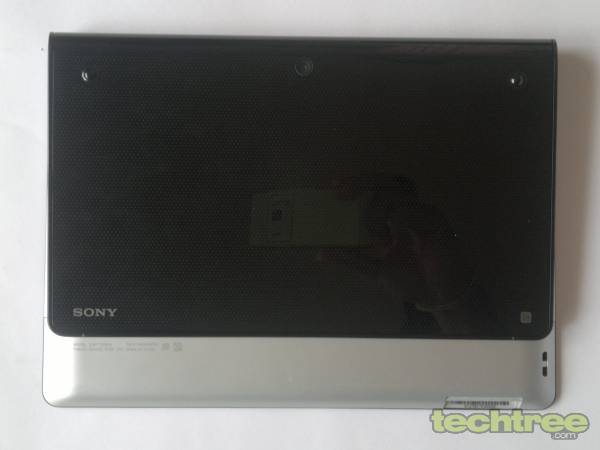
Review: Sony Tablet S The retail box packs in a tablet, charger, a wrist strap, and a warranty card. The device measures 9.5" (l) x 6.7" (w) x 0.8" (d) and weighs around 600 grammes. The tab features a unique magazine fold-out design that props the screen at an angle when placed on a table. At the front is a 9.4" screen surrounded by a black bezel and a front facing VGA camera. The design is refreshingly new and the tablet is quite light to carry.

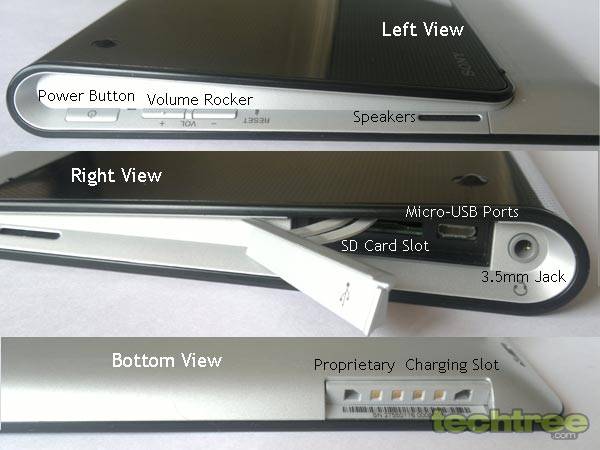
Sony has put in a proprietary charging port with a rather bulky charger so you might find it a bit difficult to charge the tab when on the move. Moreover, it has opted for a SD card slot expandable to 32 GB, over the microSD card slot. If you own a digital camera, you just need to pop in the card and you can transfer images and videos with ease.

Review: Sony Tablet S Other features include a micro-USB port, Wi-Fi, Bluetooth, GPS, 5 MP rear and a VGA front camera, 3.5 mm jack, and an SD card slot, 16 GB internal memory, 5000 mAh battery, and a set of sensors.


Display And Sound
The 9.4" LED-backlit touchscreen has pixel dimensions of 1280x800. The screen offers good viewing angles and brightness. The inbuilt speakers offer decent sound quality, but they could have been better. You can customise the five homescreens with widgets and shortcuts. If you have multimedia content stored on your SD Card, you will have to import into the internal storage before playing, which is a bit of a dampner. Overall, the crisp screen works like a charm.


UI And Applications
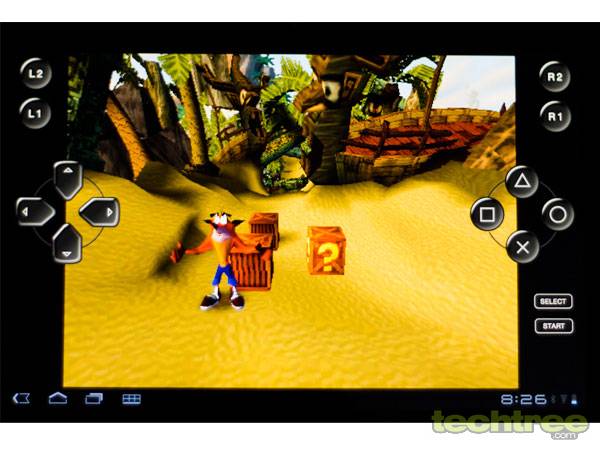
Review: Sony Tablet S The Tablet S runs Honeycomb, and is PlayStation Certified, which means that you have access to Crash Bandicoot, which is currently the only PlayStation game on offer in India. Considering that the Sony Ericsson Xperia PLAY smartphone has been around for a while, you would expect more titles. The PlayStation style controls are touch sensitive and take some time getting a hang of, especially for new users. Other preloaded games include NinJump, Angry Birds, RacingMoto, and the PSP game Pinball Heroes. There is also the GameLoft app that lets you download HD Games.

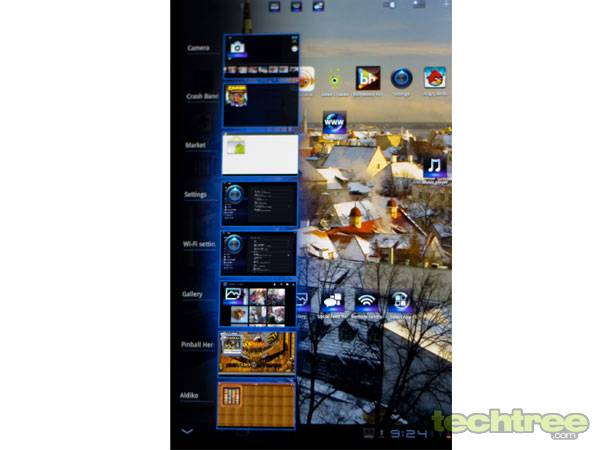
Review: Sony Tablet S The interface is quite laggy, but that seems to be an Android optimisation issue. Apart from the standard on-screen navigation keys such as Home, Back, and Menu, the tab also features a task manager. You can see minimized games and tasks next to the digital clock, which is a neat touch. The Tablet S is Flash compatible and streams online videos quite smoothly. The tablet also gives you access to the Sony's ebook store through the Reader app, and lets you convert your tab into a universal Wi-Fi remote for your other gadgets. Google Maps and Latitude provide navigation capability, but the GPS is dependent on internet connectivity. The tab also comes with the Select App, which is a virtual magazine highlighting apps from the Android market every month.

Multimedia
The built in music player is impressive, and features a built-in equalizer that could do with a few more presets.

Review: Sony Tablet S The 5 MP rear camera is fairly decent. Considering that this is more of a gaming tablet, the quality is not so disappointing and images offer good amount of details. The videos recorded are saved in the MP4 format, and are not too bad either.

The tab can handle 1080p videos, but the default player surprisingly cannot play 1080p MP4 videos. Moreover, full-HD video playback is extremely choppy. It does not support DivX and XviD formats either, so you will need third-party video players. At 720p though, the playback is smooth.


Battery And Verdict
The 5000 mAh battery's performance is disappointing. A couple of hours of gaming and the battery drains down to almost 50%. For moderate use, the battery would last up to 7 hours. The tablet is feature-rich, but it doesn't justify its expensive price tag. If you are willing to spend that much, Lenovo's IdeaPad K1 is a better option.


Features: 3/5
Design And Build Quality: 3.5/5
Performance: 3/5
Value For Money: 3/5
Mojo: 3/5
Overall Rating: 3/5