Showing posts with label Laptop. Show all posts

Monday, April 9, 2012

How would you change ASUS' Transformer Prime?

Image
"All hail the new king," was how we capped off our review of the Transformer Prime, which simply blew us away. Gaming performance was astonishing and it only improved when Ice Cream Sandwich appeared in the middle of this year's CES. In fact, the only issues we could find involved a less-than-ideal speaker placement, slightly flat color reproduction and the fact that the keyboard dock and battery is an additional $150. The company's even getting around fixing the GPS issue with the soon-to-be-released dongle attachment. But then we wanna hear your opinions about how this thing behaves in the real world: what are your feelings using this thing on a daily basis? Can you use it instead of a laptop or Ultrabook? What do you love, what do you hate and, if Asus' was watching, how would you change it?

Friday, April 6, 2012

Review: Acer Aspire TimelineX 5830TG-2413G50Mnbb

Review: Acer Aspire TimelineX 5830TG-2413G50Mnbb
Pros:Good battery life; Good performance; NVIDIA Optimus; Good looks and ergonomics; Slim profile; Great positional audio; Price.
Cons:Bad viewing angle of LCD; Glossy screen and bezel gathers dust and fingerprints; Battery is not replaceable or upgradable; No PCMCIA card slot.
Acer Aspire TimelineX 5830TG-2413G50Mnbb
Street price: Rs 41,295 (Flipkart.com)

Acer introduced the TimelineX series of laptops in its Aspire range a couple of years ago, separating them from the flock by their extraordinary battery backup. Acer continues to manufacture TimelineX series laptops, now using newer components with the latest Intel's second generation Core processors. The Acer Aspire TimelineX 5830TG-2413G50Mnbb was sent to us for a review. It was obvious for us to expect a good battery life and a better performance. The review will tell you whether or not this TimelineX lived up to our expectations.

Review: Acer Aspire TimelineX 5830TG-2413G50Mnbb

The Acer Aspire TimelineX 5830TG-2413G50Mnbb.


Design And Features
The Acer Aspire TimelineX 5830TG instantly mesmerises you with its slim profile at just 24 mm thickness. The sturdy blue body is constructed out of plastic and aluminium with a rich brushed finish. The 15.6" 1366x768 LED backlit panel is just 6 mm thick at the bezel. The screen and the bezel have glossy finish, which easily gathers dust and fingerprints. The hinge of the lid is pretty sturdy, making it unnecessary to have a lock to secure it. It can open up to 150 degrees wide.

Review: Acer Aspire TimelineX 5830TG-2413G50Mnbb

The TimelineX is noted for its slim profile.


Acer has changed the type of keyboard to chiclet-style in this iteration of the TimelineX laptops. This is a full size keyboard with a separate Numeric pad. The keys are comfortably spaced and have a good tactile feedback. The direction keys seem to be too small, though it is hardly a negative to be considered. Function keys double as keys to handle special functions using the "Fn" modifier key, which allows them to be used to perform tasks such as switching between displays, toggling wireless on and off, multimedia functions, etc. The main ENTER key is deliberately made larger so that you don't miss this oft used key, while the SPACEBAR is of perfect length. The touchpad supports multi-touch and has a clearly demarcated vertical scroll zone. It is intelligently placed right below the SPACEBAR, thus reducing the chances of the palm from accidentally touching it.

A backlit Power button is present just above the keyboard towards the left corner, while the right corner has two blue LED indicators to conveniently indicate the status of CAPS and Numeric lock. There is also the PowerSmart button, which can switch the laptop to operate in a power saving mode to maximise the battery life, although in this mode, the screen becomes too dim to work without straining your eyes. A 2.0 speaker system is present behind the perforated metallic strip at the centre. Acer mentions that these are professionally tuned with Dolby Home Theater 4.0 certification.

Review: Acer Aspire TimelineX 5830TG-2413G50Mnbb
The laptop has a comfortable chiclet-style keyboard.


Three USB 2.0 ports are provided side by side on the left side of the laptop to connect peripheral devices. A DVD-RW drive is situated next to them to take care of tasks related to optical discs.

Review: Acer Aspire TimelineX 5830TG-2413G50Mnbb
Ports on the left side.

The ventilation grills are flanked by a Kensington lock slot on its left and various ports on the right. These ports include a Gigabit Ethernet port, a D-Sub port to connect older monitors, an HDMI port for HDTV output, a SuperSpeed USB 3.0 port marked by its blue plastic interior and audio jacks for microphone and headphones. The USB 3.0 port in this laptop supports charging of devices such as mobile phones and media players even when the laptop is switched off.

Review: Acer Aspire TimelineX 5830TG-2413G50Mnbb
Ports on the right side.

A multi-memory card reader slot has been provided at the front. Various LED indicators for power, hard drive activity, and Wi-Fi are present just besides this. This laptop also has a battery gauge button with an LED at the centre. This button lets you find out the battery charge status by pressing it, even when the laptop is switched off. The LED at the centre of this button glows red if the battery is low and blue when it is charged.

Review: Acer Aspire TimelineX 5830TG-2413G50Mnbb
Indicators and battery gauge button on the front.

Ventilation grills are present at the bottom of the laptop for hot air exhaust. RAM can be upgraded from the 3 GB to 8 GB by opening the panel secured by screws. The laptop comes with a six-cell battery with the manufacturer rating of 6000 mAh. Unfortunately, the battery is concealed and cannot be replaced or upgraded by the user.

The laptop is powered by an Intel Core i5-2410M dual-core hyperthreaded processor running at 2.30 GHz, with 2.90 GHz Turboboost. It comes with 3 GB DDR3 memory and a 500 GB 5,400 RPM hard drive. The graphics subsystem is handled by NVIDIA Optimus technology, which intelligently switches between the Intel onboard and NVIDIA GT 540M graphics to manage performance and battery life. You can also force the graphics processor to be used with an application via the context menu.

Acer provides Windows 7 Home Premium with this laptop. It also provides MS Office 2010 Starter Edition along with a 30-day trial version of McAfee Internet Security Suite and a few backup tools, disc burning utility, Acer GameZone Console, etc, to make sure that the laptop can be used right after you buy it without having to install anything extra.

Performance
Thanks to the powerful processor and graphics, the laptop exhibits an overall sound performance. Watching movies and listening to music is not a problem because of the good set of speakers, and the crisp screen. Since it is not a 1080p display, any 1080p content played on it is scaled down to the native resolution, thus reducing the system load.

Gaming performance of this laptop is decent with the GT 540M aptly handling medium to high settings in most games. We tried Battlefield: Bad Company 2, which yielded around 30 fps at high settings with 4x MSAA. Similarly, Dirt3 also performed without any problem. One possible reason for the good performance is that the display resolution is limited to the display's native resolution of 1366x768. The laptop does get quite hot after around 15 minutes of such gaming, after which the CPU throttling invariably steps in and reduces the gaming performance.

Windows Experience Index shows that this system is more powerful than many a desktops.

Review: Acer Aspire TimelineX 5830TG-2413G50Mnbb
Windows Experience Index.


Synthetic benchmark results are as follows:

Review: Acer Aspire TimelineX 5830TG-2413G50Mnbb
PCMark 7 score.

Review: Acer Aspire TimelineX 5830TG-2413G50Mnbb

3DMark 11 score.

The PCMark 7 and 3DMark 11 scores are indicative of a powerful system, easily capable of serving as a desktop replacement.

Display Performance
The 15.5" screen reproduces images with good colour and contrast. Gaming or viewing fast-paced movies is not an issue, thanks to a fast response time. However, the screen is plagued by extremely narrow viewing angle, which means that the colours cannot be viewed uniformly on the entire display from any viewing position.

Audio Performance
Audio performance was found to be exceptionally good, although it had an understandably limited bass component. The audio is very clear with dialogues crisply audible. Probably thanks to Dolby Home Theater 4 certification, the speakers present an excellent soundstage with the audio seemingly enveloping you - something quite unexpected of a pair of speakers placed less than 30 cm apart. Overall, the 5830TG exhibits an excellent positional audio performance.

Battery Life And Power consumption
We measured the battery life by actually using the laptop and also by Battery Eater Pro. While using it, we chose the Balanced power scheme of Windows 7 and performed regular tasks such as using a word processor, surfing the internet using Wi-Fi, listening to occasional music and video. The laptop lasted for around 8 hours and 26 minutes, which pretty much corroborates Acer's claims of the long battery life.

The Battery Eater Pro test results did not disappoint either. The two tests run in this utility are the Reader's test which simulates real-world reading scenario, while the Classic test uses OpenGL rendering to simulate heavy usage such as gaming. The battery backup lasted for 4 hours 4 minutes in the Reader's test, while it lasted for 2 hours 23 minutes in the Classic test. The Battery Eater Pro results put it on par with the Acer Aspire AS5755G in the Reader's test, but put it far ahead in the Classic test.

The laptop consumes around of 62 W when stressed to the limit. During regular activity with the Balanced power scheme of Windows 7, it consumes an average of just 18 W. This means that the entire laptop consumes as much power as a regular 23" LED monitor.

Verdict
The Acer Aspire TimelineX 5830TG-2413G50Mnbb presents a tremendous desktop replacement option while exhibiting extraordinary battery backup. Students who live in hostels and working professionals who are on the move would find it appealing due to its workhorse capability and good multimedia performance. A good gaming experience with the discrete graphics and excellent positional audio is a bonus. There are a few negatives as well, but these fade in view of the positives offered by the 5830TG. The laptop is priced well at a street price of Rs 41,295 with a 1-year International Travellers Warranty and free Transit Insurance.

Features: 4/5
Design & Features: 4/5
Performance: 4.5/5
Value For Money: 4/5
MoJo: 4.5/5

Overall Rating: 4/5

Review: Acer Aspire One 722

Review: Acer Aspire One 722
Pros:Great performance; Relatively big screen; HDMI port; Well-priced.
Cons:Heating issues; Mediocre keyboard.
Acer Aspire One 722
MRP: Rs 18,550
Street Price (As On 28-Oct-2011): Rs 18,600 (Flipkart.com)

Just when we were getting bored of Atom-based netbooks, Acer has brought some variety to the market with its latest offering. The Aspire One 722 features AMD's C50 APU (Accelerated Processing Unit), which promises to bring better performance to the table.


Design And Build Quality
The 722's retail box contains the netbook, power brick, and a carry pouch. The black model (also available in white, cyan, and red) we received sports a classic look with a droplet pattern on the lid. The ripple effect is well done and allows the device to look distinct without being gaudy. The display hinges are tight and sturdy and as a whole, the netbook seems to have been designed to survive a fall or two. The device's back panel offers relatively easy access to the internals, with only one screw standing in your way.


Review: Acer Aspire One 722


The keyboard sports a very thin bezel to make better use of the available space. Similar to the previously reviewed Aspire One Happy 2, the keys are relatively bigger than found on most netbooks. Although it gets the job done, an island-type keyboard would have made the experience better.

The trackpad sports a matte finish that runs through the entire lower half of the laptop. The touchpad offers good sensitivity and is accompanied by a vertical scrolling line. It supports a few touch gestures too. However, there's no visual separation between the mouse buttons, and they are not as big as I would have liked.


Review: Acer Aspire One 722


The laptop measures 11.2" (l) x 7.9" (w) x 1" (d), and weighs 1.3 kg. The chassis has been made of high-quality plastic and has no creaks whatsoever.


Review: Acer Aspire One 722
Side views.


Display And Sound
The 722 sports an 11.6" LED backlit display with 1024x600 pixels. Similar to the Happy 2, the screen is relatively brighter than most netbooks. The colours look good, but the screen is reflective, which can be annoying at times.

The two tiny speakers at the bottom are not very loud, but they get the job done. However, while watching movies, it's better to plug in your favourite earphones.


Performance
The AMD C-50 APU is incorporated with AMD Radeon 6250 graphics. The dual-core CPU is clocked at 1 GHz and is coupled with 2 GB of RAM. Other specs include Wi-Fi, Bluetooth 3.0, an HDMI port, webcam, SD memory card reader, and a 320 GB hard drive spinning at 5200 rpm.

The device comes pre-installed with Windows 7 Starter and includes a free ad-supported Office Starter 2010, which is good enough for daily tasks. Acer has also bundled some bloatware, McAfee Internet Security being the most annoying of the lot.

The 722 never has a hard time handling basic tasks, and can also take on intensive image-editing software such as Photoshop. It simply outperforms most Atom-based devices and is also capable of playing 1080p videos with ease. Moreover, the device is a great companion for some casual gaming on the go. Surprisingly, it managed to run Call of Duty: Modern Warfare 2 at 18 to 22 fps with anti-aliasing turned off. This is not as impressive as the HP Pavillion dm1z's performance, but is still a plus point for a netbook at this price. On the flipside, the device tends to heat up more than normal netbooks. I'm looking at you stupid, tiny heat vent.


Review: Acer Aspire One 722
Call Of Duty: Modern Warfare 2 running at an average fps of 20.


Review: Acer Aspire One 722

Windows Experience Index.

Review: Acer Aspire One 722

PCMark 7 score.

Battery Performance
The main purpose of the netbok is its portability, and it cannot be achieved without great battery life. The 722's 6-cell battery powers the device for 7.5 hours under normal use with brightness set to around 50%, and for slightly more than 4 hours while watching movies.

We also ran the Battery Eater benchmarks, and the results are as below. Note that the brightness had been set to maximum during testing. The increased brightness levels offered by this netbook has caused a slight dip in the test results.

Review: Acer Aspire One 722


Verdict
The Aspire One 722 stands out in a crowd due to its design and performance. It humbles every other similarly priced Atom-based netbook. Moreover, it packs in an HDMI port and a bright 11.6" widescreen display.

On the other hand, its keyboard could have been better, and the system has a bit of a heating issue. Still, considering the performance, it's a good deal for folks looking for a decent netbook without crossing the 20k mark.


Features: 4.5/5
Design And Build Quality: 3.5/5
Performance: 4/5
Value For Money: 4.5/5
Mojo: 4/5

Overall Rating: 4/5

Review: Acer Aspire One Happy 2

Review: Acer Aspire One Happy 2
Pros:Trendy looks; Lightweight; Great build quality; Well-priced.
Cons:Ordinary battery performance.
Acer Aspire One Happy 2 AOHAPPY2-N578Qyy
MRP: Rs 16,500
Street Price: Rs 15,800 (Infibeam.com)


This is what you get when a computer maker recruits a bunch of food-loving hippies to design a laptop. Fortunately, this isn't always a bad thing. The Happy 2 netbook is available in various flavours colours such as Banana Cream, Blueberry Shake, Strawberry Yogurt, and Papaya Milk. The device offers not only a unique look, but also the flexibility to switch between Windows and Android.


Design And Build Quality
The retail package contains the netbook, power brick, and a nice carry pouch. I never liked the idea of colourful laptops, and have always settled for black. However, I actually found the Banana Cream (yellow) option quite refreshing. Although not as impressive in pictures, the device looks very pleasant in real life. Moreover, the textured droplet pattern on the lid looks great and is appropriate, considering the naming convention inspired by tropical juices.


Review: Acer Aspire One Happy 2


The keyboard sports a very thin bezel, and runs from edge-to-edge to make better use of the available space. Although not of the island type, the keys are relatively bigger than found on most netbooks. However, I personally prefer small but well-spaced keys over bigger and more crowded ones.


Review: Acer Aspire One Happy 2


The trackpad looks trendy, continuing the colour scheme from the lid. The left and right mouse buttons have no visual separation between them. The pad features a few gesture controls, as well as a vertical scrolling line. Needless to say, most gesture controls aren't very useful on a small touchpad.

The Happy 2 measures 10.2" (l) x 7.3" (w) x 1" (d), and weighs 1.3 kg. The chassis is made of high-quality plastic, and looks like it can survive a fall or two. The hinge is sturdy, and the battery can be accessed easily. Overall, the build quality of this device is very good, considering the price tag.


Review: Acer Aspire One Happy 2

Right side view.

Review: Acer Aspire One Happy 2

Left side view.


Display And Sound
The device features a 10.1" LED backlit display, with pixel dimensions of 1024x600. The colours look good and the brightness level is impressive. However, the screen is reflective, and can be annoying while working near a bright light source.

The speakers at the bottom are reasonably loud, but you're better off with earphones while watching a movie. The sound quality through the 3.5 mm jack is impressive, provided you have decent earphones.


Performance
The device is powered by a dual-core Intel Atom N570 CPU clocked at 1.66 GHz, coupled with a single memory slot with 1 GB of RAM (upgradable to a max of 2 GB). Other specs include a 320 GB hard drive spinning at 5200 rpm, WI-Fi, Bluetooth 3.0, webcam, and a memory card reader.

The device comes pre-installed with Windows 7 Starter and Android 2.3 (Gingerbread). I started off with the quick-booting Android, which has been slightly modified for the bigger screen. While the menus and apps are similar to what we've seen on droids, sadly, they don't go well with a laptop. Android is obviously great on phones, but on netbooks, it's useless.


Review: Acer Aspire One Happy 2


Coming to Windows, it includes a free ad-supported Office Starter 2010 that requires initial setup (by clicking the Word and Excel icons from the Applications menu) to work. There are a few more free unwanted software too, which are better off uninstalled from your laptop on the very first boot.

The netbook handles basic computing very well, and can also play 720p videos without any problems. Thanks to its dual-core CPU, it performs slightly better than similarly-priced rivals. It is recommended that you uninstall MacAfee Internet Security Suite, as it's capable of choking the system. You can always replace it with a lighter and free antivirus programme, such as avast!.

While the netbook performs well, the new Atom is not really a big improvement over its predecessors. Here are the results of the synthetic benchmarks:


Review: Acer Aspire One Happy 2

Windows Experience Index.


Review: Acer Aspire One Happy 2

PCMark 7 score.


Battery Performance
Here's one of the most important aspects of a netbook - its battery life. The 6-cell, 4240 mAh battery powers the device for 8 hours under normal use. On the other hand, it lasts for little more than five hours under heavy use. As part of our testing process, we also ran the Battery Eater benchmarks, and the results are as below. Note that the results of these tests are inferior to the real-world results because the brightness had been set to maximum in the former.


Review: Acer Aspire One Happy 2


Verdict
The Acer One Happy 2 is one stylish device that's easy on the eyes. Its performance is quite good, and the product is not expensive either. On the other hand, it didn't do too well in our battery tests. However, as mentioned earlier, the device's relatively brighter screen could be the reason behind this.

At a price tag of Rs 15,800, this well-built laptop is a good companion for college-goers, and it won't look odd in offices either. Thanks to these cute devices, girls will no longer have to stick with expensive laptops made by Sony. Moreover, guys need not shy away from the Blueberry-coloured one.


Features: 4/5
Design And Build Quality: 4/5
Performance: 3.5/5
Value For Money: 4/5
Mojo: 4/5

Overall Rating: 4/5

Review: Dell Vostro 3350

Review: Dell Vostro 3350
Pros:Excellent build quality; Ergonomics; Excellent battery life; Necessary documentation provided.
Cons:Gets a little hot after an hour of usage; Poor speaker sound quality; A bit expensive.
Dell Vostro 3350
MRP: Rs 46,000

The Vostro series of laptops from Dell primarily caters to business users. Having said that, we have often found it good enough for home users too. Recently, Dell has refreshed this line-up into its third generation, with new hardware and better styling. Off these, the 3300 series comes with 13.3" display and is meant for users who work on the go, and would want to carry their laptops around. We have the Dell Vostro 3350 laptop with us today. The model we received, is the top of the line 3350 model with speedy components including a dual-core Intel Core i5-2410M running at 2.30 GHz, 4 GB DDR3 RAM, a 320 GB hard drive spinning at 7,200 rpm, and onboard Intel GMA 3000.


Review: Dell Vostro 3350
The Dell Vostro 3350.


BundleDell Vostro 3350
65 W power adapter
User manual
Safety and environmental protection booklet
Warranty booklet
Dell Windows 7 Professional 64-bit reinstallation DVD
Dell Resource Media (Drivers & Utilities) DVD
Dell Resource Media (Webcam Central) DVD
Dell DigitalPersona Fingerprint software CD
Roxio Creator Starter CD
Trend Micro Worry-Free Business Security Service CD

Design And Features
The Dell Vostro 3350 is a portable laptop with a width of 33 cm, depth of 22.5 cm and a thickness of around 2.8 cm. It weighs a little over 2 kg,  allowing you to easily carry it with you in your backpack. The case is made with a combination of aluminium and plastic, and the build quality appears to be very good. The matte finish makes sure that it doesn't gather fingerprints. The piece we received came in the Lucerne Red colour scheme, and the laptop is also available in Brisbane Bronze and Aberdeen Silver.

The first thing you will notice while opening the laptop lid, is that it is remarkably rigid. This is due to the sturdy metal hinges, which offer a tight grip and also let you open up the lid to as much as 140 degrees.


Review: Dell Vostro 3350
Sturdy metal hinge on the Dell Vostro 3350 seems to be made to last.


Ports and connectivity options are well spaced out around the periphery of the 3350. High speed data transfer is possible via a couple of SuperSpeed USB 3.0 ports marked blue, placed on the left side. An Ethernet port is also available for broadband connectivity. You will also find the DVD Rewriter on this side.


Review: Dell Vostro 3350


Turning to the right, there is eSATA/USB 2.0 combo port, audio sockets for microphone and headphone, HDMI as well as VGA port to connect to external displays. Only the eSATA/USB 2.0 combo port supports PowerShare functionality, allowing you to charge devices even when the laptop is switched off. An outlet vent is also present on this side, to let hot air out of the laptop body.


Review: Dell Vostro 3350


Other connectivity options include Intel Centrino Wireless N 1030 supporting 802.11 b/g/n and Bluetooth 3.0+HS.

An 8-in-1 card memory reader supporting memory card formats including SD, MMC, and MS is located at the front right. There are four status LED's at the front left to indicate power, hard drive activity, battery charging, and wireless network.


Review: Dell Vostro 3350


There are a number of grills on the bottom cover of the 3350, providing enough ventilation to cool the interiors. The laptop comes with a powerful 8-cell 40 Wh, 2.62 Ah battery that promises very good backup time. It does not feature any port for a docking station, so you cannot use a battery slice option to upgrade the battery. A lone speaker is located here, producing passable quality sound.


Review: Dell Vostro 3350


The 3350 has a Chiclet-style keyboard sans a separate numeric keypad. The spacing between the keys is just like a normal computer keyboard, which allows any desktop user to easily migrate to this laptop. Unfortunately, it is not backlit, but the display emits sufficient light to make the keyboard visible in the dark. The generously sized touchpad has a matte finish and supports multi-touch gestures. Though it does not have scroll regions, but the software provided can make it available, if you need it. The mouse keys are large and quite responsive. Overall, the keyboard and touchpad have good ergonomics, so you can use them for a long duration without experiencing fatigue.


Review: Dell Vostro 3350
The Chiclet keyboard of the Dell Vostro 3350 is comfortable to use.


There are three extra buttons at the top right of the keyboard. The first button launches Windows Mobility Center, which is used to optimise power consumption of the laptop by switching off unnecessary devices. The second button brings up the Dell Support Center, which helps troubleshoot any problems experienced while using the laptop. This also includes functionalities such as PC Checking, Backup & Restore, and driver updates. The last button is unassigned, so you can assign it as a shortcut for any application of your choice.

Although this is a business laptop, probably the only feature known to give it a business feel is the fingerprint scanner that authenticates the user to log into Windows.

The lid section consists of a 13.3" LED-backlit 1366x768 display with anti-glare finish. This allows it to be used just in brightly lit environments, without the dreaded mirror effect that glossy displays suffer from. Sadly, Dell does not offer a Full HD display, when we tried to find an upgrade using the online configurator tool. However, this display is still good enough for most purposes, and you can always hook up the 3350 to a large screen using HDMI or VGA. Viewing angles of this display are not particularly impressive with brightness dropping rapidly even at angles as low as 45 degrees. Discolouration of the image occurs past around 130 degrees horizontally. We don't take vertical viewing angles into account because a laptop is not meant to be viewed from such position.

A decent quality web camera is present at the top of the bezel near the centre, flanked by digital array microphones, which reduce background noises. This feature works well during voice chats. In addition to being used as a standard webcam, Dell Webcam Central application also allows you to capture photos and videos. You can even upload them directly to YouTube, Facebook, and other services.

The Vostro 3350 comes with a dual-core Intel Core i5-2410M processor and 4 GB of DDR3 1333 MHz memory. Since it is a single memory module, one slot is free for memory upgrades. A 320 GB Samsung hard drive spinning at 7,200 rpm takes care of data storage, while optical storage is taken care of by a DVD Rewriter.

Software
The laptop is completely usable out of the box, meaning that it comes with all the software that is generally required. Dell provides Windows 7 Professional 64-bit, MS Office 2010 Starter, Trend Micro Worry-Free Business Security Service antivirus, and Roxio Creator Starter to burn CDs and DVDs. Other software available include the Dell Webcam Central and the fingerprint recognition software. Dell provides Intel My Wi-Fi software, which turns the 3350 into an access point for other devices to connect and start using shared internet.

Performance
We ran synthetic benchmarks PCMark Vantage and 3DMark Vantage (by connecting to an external display) to test the performance of the Dell Vostro 3350. All unnecessary programs were removed from the Windows Startup to avoid interference with the benchmarking process. Here are the results:


Review: Dell Vostro 3350
PCMark Vantage results for Dell Vostro 3350.


PCMark Vantage scores show a balanced systemwide performance.


Review: Dell Vostro 3350
3DMark Vantage results for Dell Vostro 3350.


The scores are exactly as expected of the on-board Intel GMA 3000 graphics chipset. This laptop is therefore not suitable for gaming, but is extremely suitable for other productive tasks.


Review: Dell Vostro 3350
For comparison's sake, here is the Windows Experience Index of the laptop.


During the course of testing, we found that the laptop only gets moderately warm even with the AC switched off. It does get hotter when stressed, though not to the point of discomfort.

Battery Life
We tried to gauge the battery life of this laptop by using real world usage and also by using Battery Eater Pro, which is a synthetic method.

In real world method, we used the laptop for surfing on the internet using Wi-Fi, using a word processor, playing a 45-minute video, and some music. We repeated the above in the High Performance and the Power Saver power plan of Windows 7 and found that the battery lasted for 2 hours 41 minutes in the former, and 3 hours 54 minutes for the latter. Considering the hardware that comprises this laptop, these scores are commendable.

You can get longer battery life by switching off the wireless module, but we did not do it, in order to simulate real world usage.

Next, we switched to the High Performance power plan and used Battery Eater Pro in the Classic (in full screen mode) and Reader's test. Classic test stresses the processor and the graphics, while Reader's test simply scrolls a text document as to simulate a reading process as long as the battery lasts. The laptop went on for 1 hour 7 minutes in the Classic test, while the Reader's test lasted for 4 hours 37 minutes.

Verdict
The Dell Vostro 3350 is an excellent portable laptop with rock-solid stability and good performance for most day-to-day computing activities. The 13.3" anti-glare display is easy on the eyes, while the ergonomic keyboard is a joy to use. While the Vostro series is marketed as "business laptops", calling it so might not be completely true, because the only business-related feature present here is the fingerprint scanner, while other features such as TPM are absent. Those seeking a multimedia laptop will be disappointed by the poor speaker performance, but they can certainly hook up a pair of headphones instead. The Intel GMA 3000 graphics limits its gaming capability. Thanks to the powerful 8-cell battery, the power backup time is very good.

The Vostro 3350 comes with all the software you would normally need for your daily work and you won't need to buy anything more. You can configure from amongst the three variants of this laptop online and purchase it as well. It comes with 1-year ProSupport: Next Business Day Onsite Service, which is a 24x7 support with priority queue ensuring minimum downtime and a complimentary 2 GB online password protected backup facility using Dell DataSafe service. We would have recommended it to students, had its price tag not been so high. The Asus K Series K53SV-SX520D provides excellent value for money with better performance (including decent gaming) and a lower price tag. However, the professionals working on the go wouldn't mind spending that much, as it is worth every penny.

Features: 3.5/5
Design And Build Quality: 4/5
Performance: 3.5/5
Value For Money: 2/5
Mojo: 4/5

Overall Rating: 3.5/5

Review: Cooler Master Notepal ErgoStand

Review: Cooler Master Notepal ErgoStand
Pros:Excellent build quality; Powered USB hub; Large PWM fan (speed adjustable); Well-suited for desktop replacements; Good cable management; Silent operation.
Cons:Power adapter not supplied.
Cooler Master Notepal ErgoStand
MRP: Rs 3000
Street Price (As On 18-Dec-2012): Rs 1900 (PrimeABGB.com); Rs 2100 (Letsbuy.com); Rs 2200 (TheITDepot.com)


There's a lot more in common between Sports Utility Vehicles (SUV) and laptops than you'd imagine. The former are meant to be driven off-road, but people still use them on tarmac because they're considered cooler than sedans. Similarly, laptops are also designed to be used outdoors and on the move. However, because the cool kids don't want to be caught dead with a desktop PC, everyone treats their laptops as awkward desktop replacements.

Although there is no way to make SUVs suck less on the blacktop, there are many means available to make laptops a lot more manageable for extended desktop usage. A laptop stand is one such option.


Review: Cooler Master Notepal ErgoStand
The 140 mm fan can push a large volume of air at lower speeds.

Big And Sturdy
Cooler Master's NotePal ErgoStand combines a cooling pad, USB hub, and notebook stand in one sturdy package. Make no mistake - this isn't something you can lug around, as it weighs over a kilo. Much of its heft is attributed to a humongous metal grille that covers most of the cooler's surface area. Unlike its plastic brethren, the ErgoStand's grille doesn't absorb and retain heat. This enables better thermal dissipation and provides excellent structural rigidity at the same time. What isn't made of metal is fashioned out of rugged plastic. In short, this puppy can take a lot of abuse before anything breaks.


Review: Cooler Master Notepal ErgoStand
Notches on the base allow for four levels of height adjustment.

The cooler's main chassis is hinged to a C-shaped base, which features four notches for achieving as many inclination adjustment settings. Four grippy rubber blocks on the cooler's upper surface keep your laptop anchored safely. However, for higher inclination settings, you must use the supplied anti-slip barriers that fit into the front edge of the cooler. These attachments can be adjusted horizontally to support the smallest netbooks as well as full-sized desktop replacements. The rubber feet at the bottom do a fine job of keeping things steady as well. Overall, Cooler Master has chosen the right blend of plastic and metal in the right places for a clever balance of weight and structural rigidity.


Review: Cooler Master Notepal ErgoStand
The anti-slip barrier placed near the trackpad prevents the laptop from sliding off.

Loaded With Features
The cooler's massive 140 mm fan employs a high-quality bearing (rifle type) that combines noiseless operation with high durability. The fan itself is hooked to a rotary dial (PWM type) for smooth adjustment. Using a large single fan instead of two smaller ones is smarter, because it's possible to push a larger volume of air at lower fan speeds.

The ErgoStand isn't merely a cooler. For the price, it also includes a four-port USB hub and a couple of nifty cable management options. Cable clips at the rear combined with channels on either side let you streamline USB and power cables.


Review: Cooler Master Notepal ErgoStand
The ErgoStand includes a rich feature set for the price.

The USB hubs are practically useless for power hungry devices, since they draw power from the same USB cable that connects the cooler to your laptop. Fortunately, there is a provision for a 5V DC input socket, which provides the hub with enough juice to run just about anything. Unfortunately, the DC adapter has to be purchased separately.


Testing And Performance
For testing, I used a 13" Dell Vostro 3350 laptop bearing a 2.3 GHz Intel Core i5-2410M processor. Stress tests using Prime95 and FurMark took the CPU and GPU to their thermal thresholds. I started off by letting the uncooled laptop idle for 10 minutes while noting the temperature readings on the bottom and top surfaces at regular intervals. This was followed by another 10 minutes of stress-testing sans the cooler. At this point, the ErgoStand was installed and operated at full capacity. Temperature variations were then noted over the next 15 minutes.

Review: Cooler Master Notepal ErgoStand
Before we analyse the test results, I should clarify that these temperatures represent the absolute worst case scenario. Moreover, unless you own a MacBook Pro or any other laptop with a metal chassis, don't expect laptop coolers to substantially reduce CPU temperature. Laptops with plastic bodies tend to thermally insulate the internal components, so a cooler is more for your personal comfort than for thermal regulation of the device.

The ErgoStand however, did a fine job of keeping the Vostro cool. Once set at full blast, it managed to bring the CPU temperature down by 5 degrees. The rising temperature levels on the top and bottom surfaces were also arrested, despite both CPU and GPU being strained at 100% by the benchmarks. Under normal usage, expect much cooler operating temperatures with this product.


Review: Cooler Master Notepal ErgoStand
The ErgoStand makes laptops as ergonomic as desktops.

For Desktop Replacements
This Cooler Master product is quite heavy and has rubber feet at the bottom, not cushions. That's a tell-tale sign that it's meant to be used on a desk and not on the lap. It's targeted at those who want to make their desktop replacements more comfortable. The idea is to set up the stand at steeper inclinations, in order to bring laptop displays to a comfortable viewing height, like that of a regular desktop monitor. This way, you don't have to crane your neck down and risk long-term injury.

It's clear that the ErgoStand is quite good at what it does. It's built tough with generous use of metal, while providing excellent ergonomics. Its 140 mm fan is silent and powerful at the same time. It may not look too stylish, but its capabilities are unrivalled in the sub-3000 rupees segment.


Performance: 4/5
Design And Build Quality: 4.5/5
Features: 4.5/5
Value: 4/5
Mojo: 5/5

Overall Rating: 4.5/5

Review: Apple MacBook Pro 15 (Late 2011)

Review: Apple MacBook Pro 15 (Late 2011)
Pros:Excellent build and design; Great performance; Ergonomic keyboard and trackpad; Includes service manual; Good battery life.
Cons:Only two USB ports; Heats up under stress; No USB 3.0; No Blu-ray drive; No HDMI port; Expensive.
Apple MacBook Pro 15 (Late 2011)
MRP: Rs 1,24,900


UPDATE: The video review of the MacBook Pro 15 (Late 2011) is now available here.


Apple launches a new iteration of most of its products every year and it almost religiously follows a timetable for that. Late last year, it launched the latest iterations of its MacBook Pro high-performance laptops with upgraded hardware and software. We received the higher-end 15" model of the series. It is a powerhouse, packing in a quad-core 2.4 GHz Intel Core i7 processor with 4 GB RAM, an AMD Radeon HD 6770 1 GB graphics card, and ample storage space of 750 GB with a fast 7200 rpm hard drive. Not to forget, it runs on the latest Mac OS X Lion.


Review: Apple MacBook Pro 15 (Late 2011)

 
Bundle
MacBook Pro 15
Display cleaning cloth
85 W MagSafe power adapter with AC wall plug and power cord
Software DVDs
Printed and electronic documentation

The user manual contains details about servicing the device, which includes replacing components such as the hard drive.

Design And Features
Review: Apple MacBook Pro 15 (Late 2011)The laptop launched in late 2011 comes in the same beautiful aluminium unibody casing that has become a hallmark of this series. The overall build quality is solid, though we must mention here that the laptop is considerably heavy at 2.5 kg, making it difficult to carry. It is 36.5 cm across, 25 cm from top to bottom when folded, while its thickness measures at 2.3 cm at the thickest part. The screen, measuring 15.5" diagonally, is glossy, which makes it difficult to view outdoors due to reflections. Its LED-backlit 1440x900 pixel dimensions ensure crisp images with good brightness and colour reproduction when viewed upfront. However, viewing angles are poor, causing discolouration when viewing sideways. A HD webcam is situated at the centre of the top bezel for FaceTime video chatting.

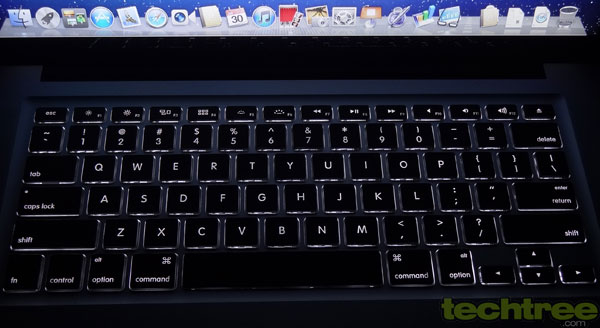
Review: Apple MacBook Pro 15 (Late 2011) This model continues to have the comfortable full-size Chiclet-style keyboard (sans the numeric keypad). It has the same size as that on the smaller models, which makes it appear smaller due to a wider body. However, I am still not comfortable with the tiny and narrow arrow keys and would rather prefer them to be square shaped. The keyboard is backlit this time around, making it easy to view and type even in the dark.

Review: Apple MacBook Pro 15 (Late 2011)Stereo speakers are present on either side of the keyboard, concealed behind fine grille. A microphone is hidden under the left grille for voice chat and recording. A generously large multi-touch trackpad gives you all the cursor navigational freedom you desire. While one would opine that it would have made better sense to place it slightly to the left with the majority right-handed people in mind, Apple continues to place it ambidextrously at the centre. However, it is not a problem, thanks to the larger area it covers. It continues to be amongst the best trackpads we have come across so far.

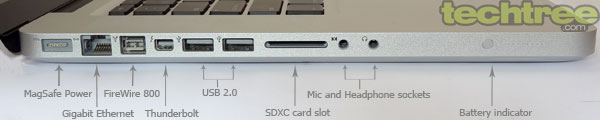
Review: Apple MacBook Pro 15 (Late 2011)All the ports have been clubbed together on the left. Apple probably thinks that two USB 2.0 ports are enough. You can also connect up to seven devices, including an external display port, at a time by daisy-chaining. Possibly, the company believes too much in the Thunderbolt port's capablility of a theoretical data transfer rate of 10 Gbps, twice that of USB 3.0. However, you might still be in need of more USB ports as Thunderbolt is still not popular, even after a year since its arrival. Network connectivity is available by means of integrated Wi-Fi and a Gigabit Ethernet port. There is a SDXC memory card slot as well and Apple continues to push the FireWire interface.

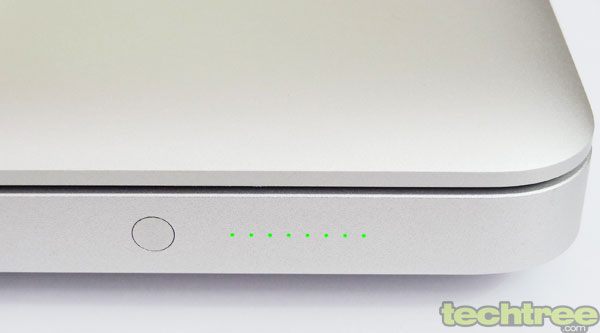
Review: Apple MacBook Pro 15 (Late 2011) A battery indicator is present just before the ports. This is a series of backlit dots that indicate the battery charge level at the press of a button situated next to them. The good thing is that you can instantly get an idea of the battery charge, even without having to power on the MacBook Pro.

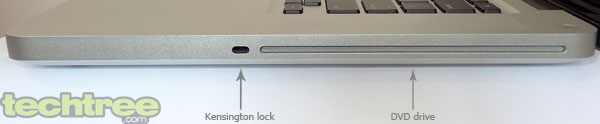
Review: Apple MacBook Pro 15 (Late 2011)A slot-type DVD writer is situated on the right. With 4 GB RAM, the MacBook Pro is powered by an Intel Core i7 quad-core processor running at 2.4 GHz, packing enough power to handle the most demanding of applications. Gaming is handled by the discrete AMD Radeon HD 6770 with 1 GB of dedicated DDR5 memory. A rather large 750 GB, 7200 rpm hard drive takes care of local storage needs. Apple claims up to 7 hours battery life, which is good enough for the powerful hardware.

The MacBook Pro comes with the latest Mac OS X Lion with all the bells and whistles as we had reviewed earlier. The faster processor appears to make the whole experience snappier than before. The good thing is that almost everything you would need comes pre-loaded, so you don't need to install anything extra and yet it doesn't feel like bloatware. iLife multimedia organiser is also bundled along. Launchpad gives you access to all your apps in one place. Mission Control allows you to swipe up or down with three fingers to get a birds-eye view of all that is going on in the MacBook Pro. Multi-touch gestures allow you to do a lot more things than before.

Performance
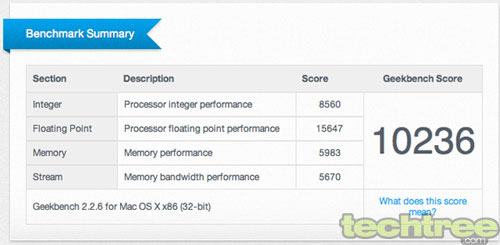
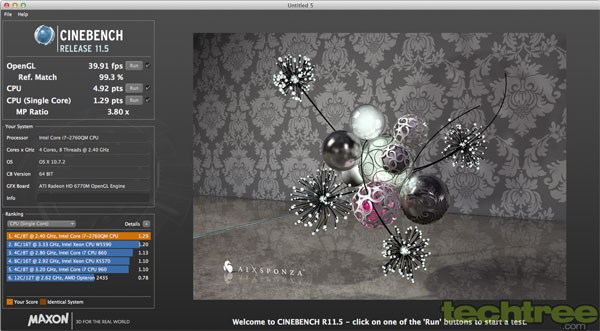
Review: Apple MacBook Pro 15 (Late 2011) The faster hardware makes things appear snappier. Getting around the OS was a breeze. Of course, a machine as powerful as this is meant to be used for processor and graphics-intensive tasks such as video editing and 3D modelling. We ran a couple of benchmarks: GeekBench 2.2.6 and CineBench R11.5 to find out how well the performance really is and here are the results.

Review: Apple MacBook Pro 15 (Late 2011) The overall performance in the above two benchmarks is obviously better than its predecessors due to the faster hardware. The eight simultaneous processor threads do speed up things a lot as was seen with the CineBench rendering. The laptop gets quite hot, especially on the left side, when stressed for more than 15 minutes.

Judging by the powerful processor and graphics card, gaming should not pose a serious challenge to this laptop. Speakers are sufficiently loud and clear for the size. With 1280x720 video capture, the quality of FaceTime camera has improved with better low-light performance.

Battery Life: The MacBook Pro lasted for three and a half hours at maximum brightness (auto brightness switched off) and keyboard backlight maxed, while watching a standard definition YouTube movie over Wi-Fi. This was inexplicably lower than what we had expected. Watching a DVD movie with the standard 70% screen brightness and keyboard backlight off resulted in around five hours of play. For more mundane tasks including web surfing, word processing, and some video and music playback, it was just shy of Apple's claimed seven hours. It is clear that the automatic switchable graphics played its part here by switching from the discrete AMD to the integrated Intel graphics, thus reducing the power consumption and battery drain.

Power Consumption: For those who need power consumption numbers, we used a Kill-A-Watt meter to find out. The measurements were done while the MacBook Pro 15 was charging. It consumes an average of 54 W when idle or simple tasks are performed, while the power consumption peaks to 89 W when there is heavy load on the processor and graphics.

The Verdict
With an updated set of hardware and the spanking new Mac OS X Lion, the new MacBook Pro 15 brings a lot more to the plate than its predecessor, especially if you have some heavy processing requirements. It maintains the same stylish aluminium unibody styling among other things such as the keyboard and trackpad, the Thunderbolt port, and the switchable graphics. It is therefore not surprising that the performance is top notch. The battery life is also good as expected.

Apple still does not provide a Blu-ray drive in its product. Could it be because it wants to push HD digital downloads via iTunes? In that case, you should stop expecting Blu-ray drives in future products as well. However, we are not able to fathom why it cannot provide an HDMI port to connect larger display devices to play back HD movies. The hardware is powerful enough to even play Full HD 3D movies. There is no lack of space, though in this case, and the company might be looking to push displays supporting its Thunderbolt port, although that will not be a good marketing move. The insufficient number of USB ports and lack of USB 3.0 are some of the other woes. The MacBook Pro is also noisier than its earlier iteration when stressed and gets quite hot.

The new MacBook Pro carries an expensive price tag of Rs 1,24,900, while there is one more 15" model with an Intel Core i7 2.2 GHz quad-core and 500 GB hard drive for Rs 20,000 less. You can get a laptop with similar or better configuration such as the Acer Aspire TimelineX 5830TG for less than half the cost.

Features: 3.5/5
Design And Build Quality: 4.5/5
Performance: 4.5/5
Value For Money: 2.5/5
Mojo: 4/5

Overall Rating: 4/5